
OCHP Lighting · Live System Documentation

Stage lighting
configuration.

Single source of truth for the Daslight 5 show file — stage plot, fixture groups, DMX network, and the full cue book for a service.

Software Daslight 5 34 fixtures · 9 models DMX 1–509 · U1 50 cues
34
Patched fixtures
9
Fixture groups · 9 models
6
myDMX 5 controllers
11
Banks · 50 scenes
00 · Operation

Running the stage lighting
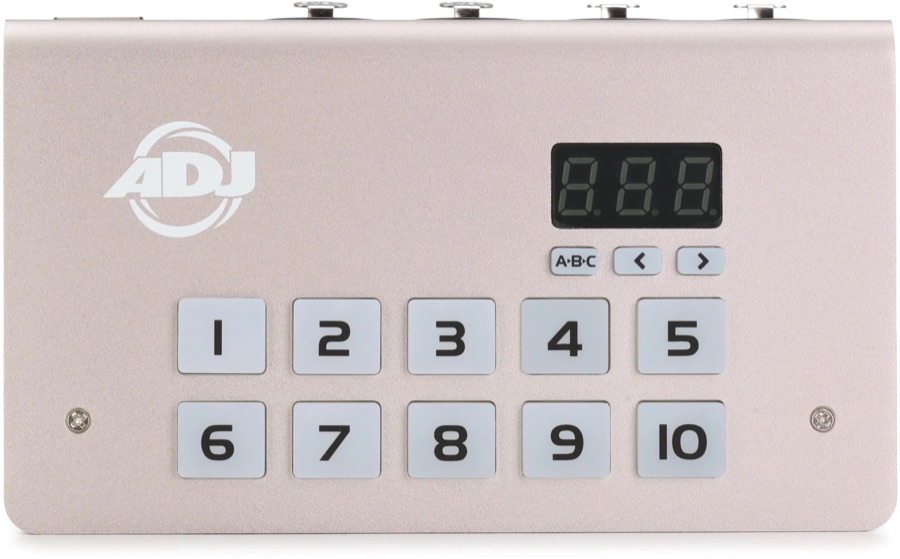
ADJ MyDMX 5 controller — red LED screen with A·B·C and left/right buttons, and scene buttons numbered 1 to 10
ADJ MyDMX 5 · the physical controller at the booth
OnPower on
    OffPower off
      Check the screen — it decides how you control the rig
      USB Screen shows “USB” Software

      Do this
      no USB Screen does not show “USB” On the box

      Scenes programmed on the box
      Troubleshooting
        01 · Rig overview

        Stage plot & rig layout

        Top-down view of the sanctuary, with each fixture placed at its real position from the Daslight 2D patch. Hover a dot for its model and DMX address; click any group to filter the scene book to cues that touch it.

        Sanctuary lighting rig
        Stylized — exact positions live in the room. Counts and roles match the Daslight patch.
        02 · Inventory

        Fixture groups

        Nine physical groups across nine fixture models. Movers float on front and upstage trusses; the Springtree spatial washes line the deck; the Chauvet pars handle back wash and back light.

        03 · DMX over Art-Net

        myDMX 5 controllers

        One USB-connected controller drives the live show — all 34 fixtures live on its Universe 0 (DMX 1–509). Five network nodes are reachable as Art-Net targets and stand ready for expansion.

        DMX universe map
        512 channels per universe · 4 universes per device · 1 active patch
        active patch available
        04 · Patch sheet

        DMX patch & addressing

        Every fixture, every channel — exactly as patched in the Daslight show file. Hover a strip segment or row to see model, group, and starting address; click to filter the scene book.

        Universe 1 · channels 1–512
        patched free
        05 · Cue book

        Scene book — service flow

        Banks are laid out in service order. Each cue shows its dimmer level, fade in and fade out (in 1/25-s ticks). Filter by bank or by the fixture group it touches.